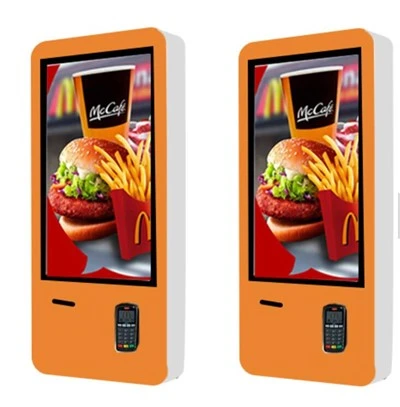
Floor standing outdoor lcd display : Understanding the Technical Logic from Display Structure to Android System
The real-world performance gap between outdoor digital signage is not determined by screen size or exterior design, but by how well the display panel's physical characteristics, the enclosure's structural design, and the Android hardware architecture are matched to each other. Two devices labeled "HD" can behave very differently: one may wash out under mall lighting, while another may stutter or overheat in a hotel lobby due to inadequate thermal design. Understanding the full chain-from panel brightness and glass treatment to Android decoding capability-is far more useful than comparing or price alone.
Display Panel: Brightness and Reflectance Determine Legibility Resolution is often mistaken for the primary indicator of quality, but ambient light is the first real filter. Indoor environments such as shopping malls and bank branches typically have illuminance of 300 to 500 lux, where a 350–500 nit indoor display performs adequately. However, when a unit is placed near a glass curtain wall or a sunlit atrium, direct sunlight and floor reflection rapidly erode contrast. The image appears washed out, and text edges lose sharpness.
For semi-outdoor or high-ambient-light positions, industrial-grade high-brightness panels in the 1,500–2,500 nit range, paired with automatic ambient-light sensing, are needed to maintain visibility at midday. But brightness comes at a cost: running at maximum output continuously accelerates backlight degradation, and excessive nighttime brightness creates light pollution. Automatic dimming matters because it balances visibility against power consumption and light trespass, rather than leaving the panel at full output indefinitely.
Another frequently overlooked specification is glass reflectance. The tempered glass front face typically reflects 4–8% of incident light. In a mall atrium with dense downlights, reflections of the lights can overwhelm the dark portions of the image. Anti-glare (AG) or anti-reflective (AR) treatment reduces this reflection while preserving transmittance. Some units also use vacuum bonding between the glass and the LCD panel to eliminate internal ghosting. For bank branches and upscale hotel lobbies, this treatment often has a more visible impact on perceived image clarity than upgrading from 1080p to 4K.
Enclosure Structure: Thermal Management and Protection Determine Sustained Performance
A outdoor touch screen kiosk is a sealed metal or aluminum-frame enclosure. Heat from the LCD panel and the Android mainboard accumulates inside. If thermal design is inadequate, the consequences are not merely "running warm": LCD panels lose contrast and response speed above their operating temperature range, while Android boards throttle under thermal load, causing video decoding stutter or triggering protective shutdown.
Current cooling approaches fall into two categories: forced-air and air-conditioning/heat-exchange. Forced-air cooling uses fans and ducting to exhaust heat. It is simple and cost-effective, suitable for indoor sites with good ventilation and controllable dust. But duct design is critical: if the intake faces the floor or sits near a sprinkler head, the fan draws moisture and dust into the enclosure, accelerating board corrosion and filter clogging. In air-conditioned malls and hotels with stable temperatures, a well-designed labyrinth duct with a dust filter is usually sufficient. However, under a glass atrium roof or in a sun-exposed position, internal temperatures can exceed ambient by 15°C or more, and forced-air efficiency drops sharply.
In such cases, air-conditioning or heat-exchange units become necessary. They actively hold internal temperature within a set range and maintain enclosure sealing against dust and humidity, at the cost of added maintenance items such as compressors and condensate drainage. A practical rule: if the installation receives more than three hours of direct sunlight on a summer afternoon and ambient temperatures may exceed 35°C, the derating risk of a forced-air design deserves scrutiny.
Another structural detail is front-frame sealing and drainage. The front gasket, bottom drain holes, and cable-entry seals determine resilience against splashes and cleaning. In a hotel lobby, water splashed from a wet mop can seep through bottom gaps and short the power board. The drainage path design and durability of interface seals are practical indicators of build quality.
Android System and Hardware: Matching Determines Manageability
Android in an advertising machine serves as the execution platform for content playback and remote management. Smoothness depends less on the Android version number and more on hardware decoding capability relative to content format.
Consider a common Allwinner A20 dual-core platform with 1GB RAM and Android 4.4: it handles 1080p image loops and standard-bitrate video without issue, and with CMS software supports split-screen layouts, scheduled power on/off, and USB updates. But if the operator plans to play 4K promotional footage or use HTML5 dynamic templates, this chip struggles: 4K video lacks hardware decode support, and software decoding causes frame drops; HTML5 rendering efficiency is insufficient, producing visible lag during page transitions. Upgrading to a newer chip platform with 4K hardware decoding and HTML5 compliance, along with at least 2GB RAM, becomes necessary.
Remote management capability is another frequently undervalued dimension. If changing content on a mall ground-floor unit requires a staff member to physically insert a USB drive each time, the operational cost far exceeds the purchase price difference. Mature Android signage solutions include a CMS that supports LAN or WAN push, scheduled volume adjustment, timed screen on/off, and playback log reporting. In bank branches with strict content compliance requirements, the system also needs program approval workflows and offline playback continuity-when the network drops, the device should continue playing locally cached content rather than going dark.
It is worth noting that some low-cost units use unbranded generic Android boards. While the spec sheet may claim "quad-core, 2G+16G," the firmware may receive no updates, and CMS compatibility may be untested, leading to failures such as scheduled power cycles not executing or WiFi failing to reconnect after a dropout. Choosing a device with a known chip platform (Rockchip, Allwinner) and a verifiable system maintenance record is more meaningful than comparing core counts.
Scenario-Based Judgment: Three Practical Decision Points
Translating this technical logic into procurement decisions comes down to three questions:
First, where will the device be installed? In air-conditioned interior corridors or hotel lobbies without direct sunlight, 500-nit brightness, anti-glare glass, and forced-air cooling suffice. The priority should shift to CMS usability and remote management. In exhibition entrances, near glass facades, or semi-outdoor corridors, the brightness threshold rises to 1,500 nits or more, and the thermal design must have headroom for localized heat buildup.
Second, what content will it display? Static posters and 1080p video loops are manageable by mainstream entry-level Android platforms. If touch interaction, 4K assets, or web embeds are involved, confirm that the chip supports the corresponding hardware decode formats and that RAM is at least 2GB.
Third, who maintains it? For unmanned branches or remote sites, prioritize models with watchdog timers (WDT) and offline playback continuity to reduce on-site restarts. For staffed retail locations, remote management requirements can be relaxed somewhat, but USB update and remote-control operation logic should be simple enough for non-technical staff.
FAQ
Q1: Is the "HD" on a floor-standing advertising machine the same as "HD" on a mall television?
No. "HD" on a TV primarily refers to resolution (1080p or 4K). On an advertising machine, real-world clarity depends more on brightness and anti-glare treatment. A 350-nit indoor signage unit beside a glass curtain wall can look worse than a lower-brightness TV placed away from direct light. Evaluate brightness (nits), panel type, and whether the protective glass has anti-glare treatment together.
Q2: Does an Android advertising machine slow down over time like a phone?
The mechanism is similar but the impact differs. Phone lag affects interaction; signage lag manifests as dropped frames or black screens during transitions. The main causes are insufficient RAM and storage fragmentation. If the device plays fixed content within a closed system (no additional apps installed), entry-level hardware can run for years without obvious lag. However, if the CMS frequently pushes large assets and the system is rarely restarted, a 1GB-RAM model may become sluggish. Choosing a model with scheduled auto-restart helps mitigate this.
Q3: Is forced-air cooling sufficient in a shopping mall, and will dust accumulation be a problem?
In air-conditioned mall interiors without direct sunlight, a well-designed forced-air system is usually adequate. Dust accumulation depends on duct design: if the intake is positioned high on the enclosure and fitted with a removable filter, dust buildup is manageable with quarterly cleaning. However, if the unit sits under a glass atrium or near a food-court exhaust, dust and grease can clog the filter faster, requiring shorter maintenance intervals or a sealed heat-exchange design.
Q4: Why do some advertising machines fail to power on automatically after a power interruption?
This is typically a BIOS or system power-management setting. In commercial deployments, devices are often connected to timer switches or master circuits and must resume playback automatically when power returns. Specify "auto power-on after restore" in procurement and test it by actually cutting power during acceptance. Some low-cost boards ship with this disabled by default and require a manual setting change or firmware update to enable.
Q5: How much difference does network-based content updates make compared with USB updates?